ATS-Friendly Resume Format: The Complete 2026 Guide
By ATS First Team · March 15, 2026 · 9 min read
You spent hours crafting the perfect resume, but it never even reached a human recruiter's eyes. Sound familiar? The culprit is almost always an Applicant Tracking System (ATS) — the software gatekeeping over 75% of corporate job applications. These systems parse, rank, and filter resumes before any human sees them, and if your formatting trips them up, your application goes straight to the digital trash. The good news: ATS-friendly formatting is not complicated once you know the rules. This guide covers everything you need to make your resume machine-readable and recruiter-ready in 2026.
What Makes a Resume ATS-Friendly vs. ATS-Unfriendly
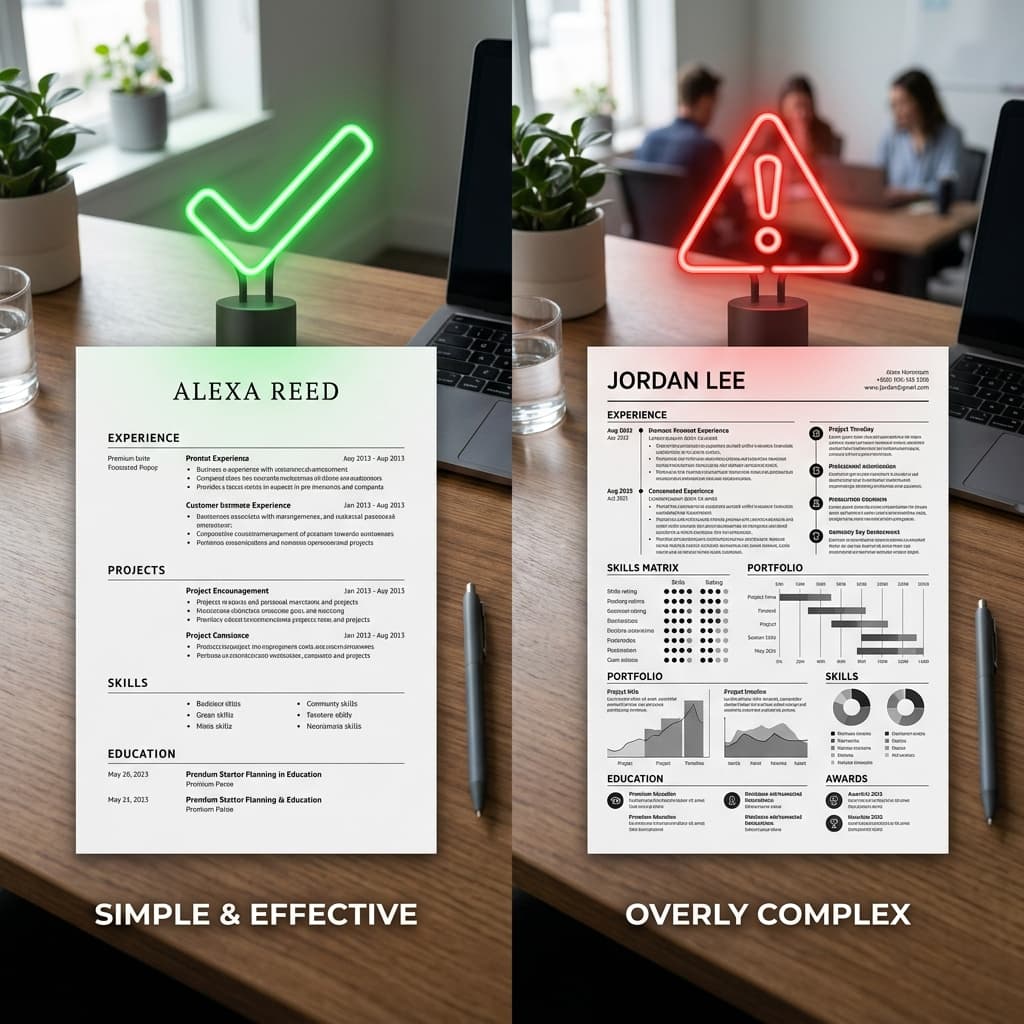
An ATS-friendly resume is one that a parsing engine can read from top to bottom without confusion. The system extracts your contact details, work history, education, and skills into structured database fields. An ATS-unfriendly resume throws the parser off with visual complexity — columns it cannot linearize, graphics it cannot read, or fonts it cannot render. When parsing fails, your data lands in the wrong fields or disappears entirely, and the ATS scores you lower than a less-qualified candidate whose resume was plain and clean.
- ATS-friendly: plain text flow, standard headings, clean bullet points, no graphics
- ATS-unfriendly: columns, text boxes, tables used for layout, embedded images, icons
- ATS-unfriendly: skill bars, pie charts, timelines, infographic-style layouts
- ATS-unfriendly: headers and footers containing contact information
PDF vs. DOCX: Which File Format Should You Use?
The PDF vs. DOCX debate is one of the most common resume questions, and the answer depends on the context. DOCX (Microsoft Word format) is the safest choice for ATS submissions because virtually every modern ATS is built to parse it natively. The text is stored as raw XML, which parsers extract with high accuracy. PDF support has improved dramatically, but older ATS platforms — still widely used in enterprise environments — struggle with PDFs, especially those saved as image-based PDFs.
Use DOCX when you are submitting through an online application portal or ATS. Use PDF when you are emailing your resume directly to a recruiter or hiring manager, attending a career fair, or uploading to a portfolio site. The PDF preserves your visual formatting pixel-perfectly on any device. The golden rule: if the job posting specifies a format, use exactly that format.
ATS-Safe Fonts (and the Decorative Fonts That Will Hurt You)
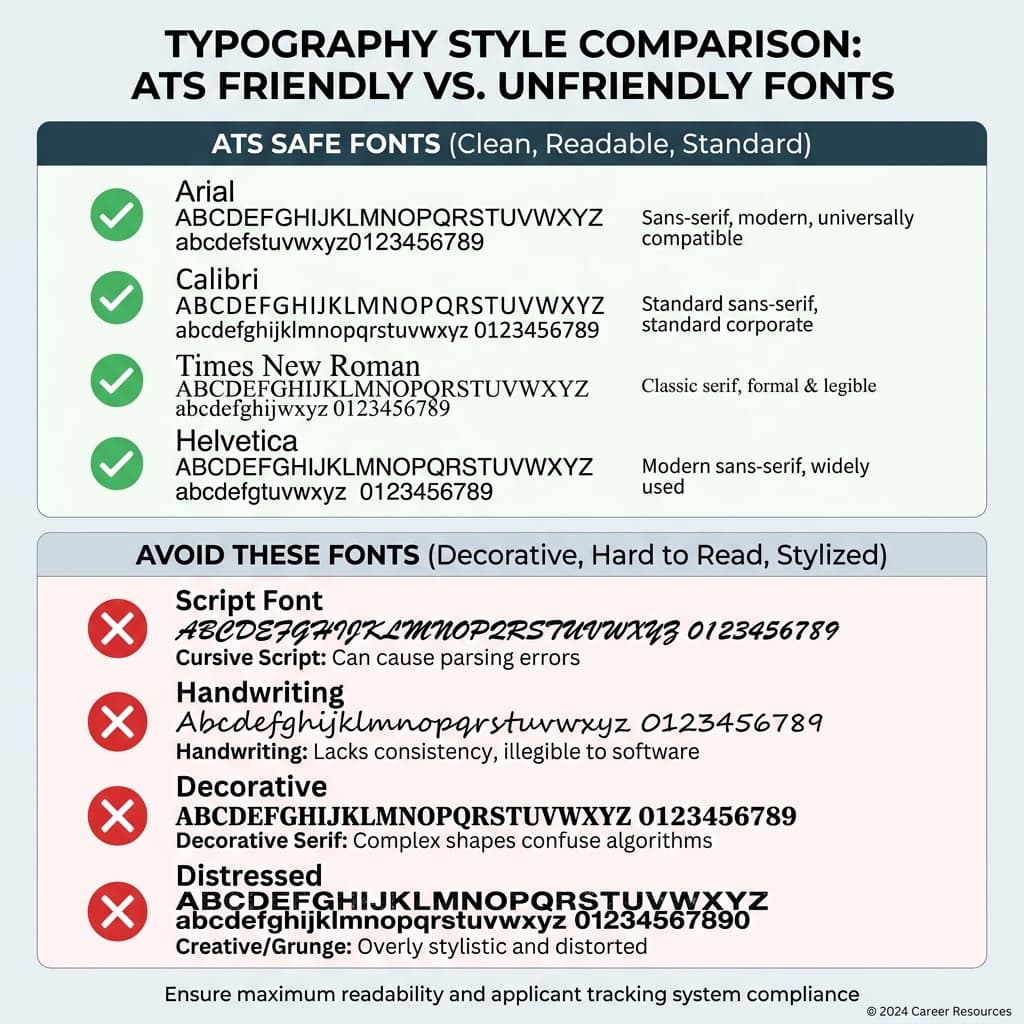
Font choice matters more than most candidates realize. ATS parsers work best with fonts that have standard character encoding and clean glyph sets. Decorative, script, or display fonts can cause character substitution errors — the parser reads a stylized letter as a question mark, corrupting entire lines of your resume.
Safe Fonts for ATS Resumes
- Arial — widely supported, clean, modern sans-serif
- Calibri — the Microsoft Office default, excellent ATS compatibility
- Times New Roman — classic serif, universally recognized
- Helvetica — professional, clean lines, strong system support
- Garamond — elegant serif that parses reliably
- Georgia — web-safe serif with excellent rendering
Fonts to Avoid Completely
- Script and handwriting fonts (Lobster, Pacifico, Dancing Script)
- Decorative display fonts (Playfair Display Heavy, Impact in non-standard weights)
- Any font downloaded from a third-party source that may not embed correctly
- Ultra-light or ultra-thin weights below 300 — parsers sometimes miss thin strokes
- Icon fonts used for bullet points or section symbols
Stick to font sizes between 10pt and 12pt for body text, and 14pt to 16pt for your name. Anything smaller than 10pt risks being missed by OCR-based parsing systems.
Layout: Why Single-Column Always Wins
Multi-column layouts look polished in a PDF viewer, but they are an ATS nightmare. A parser reads left to right, top to bottom in a single linear stream. When your resume has two columns, the parser often reads across both columns horizontally — merging content from your left-column job title with unrelated right-column skill text, creating nonsense data. Your years of experience at Company A may end up concatenated with a Python skill from your sidebar, scoring you zero points for both.
The fix is simple: use a single-column layout. All content flows in one continuous column from top to bottom. This is the format every major ATS handles flawlessly. You can still create visual hierarchy using bold text, horizontal rules, and consistent spacing — you do not need two columns to look professional.
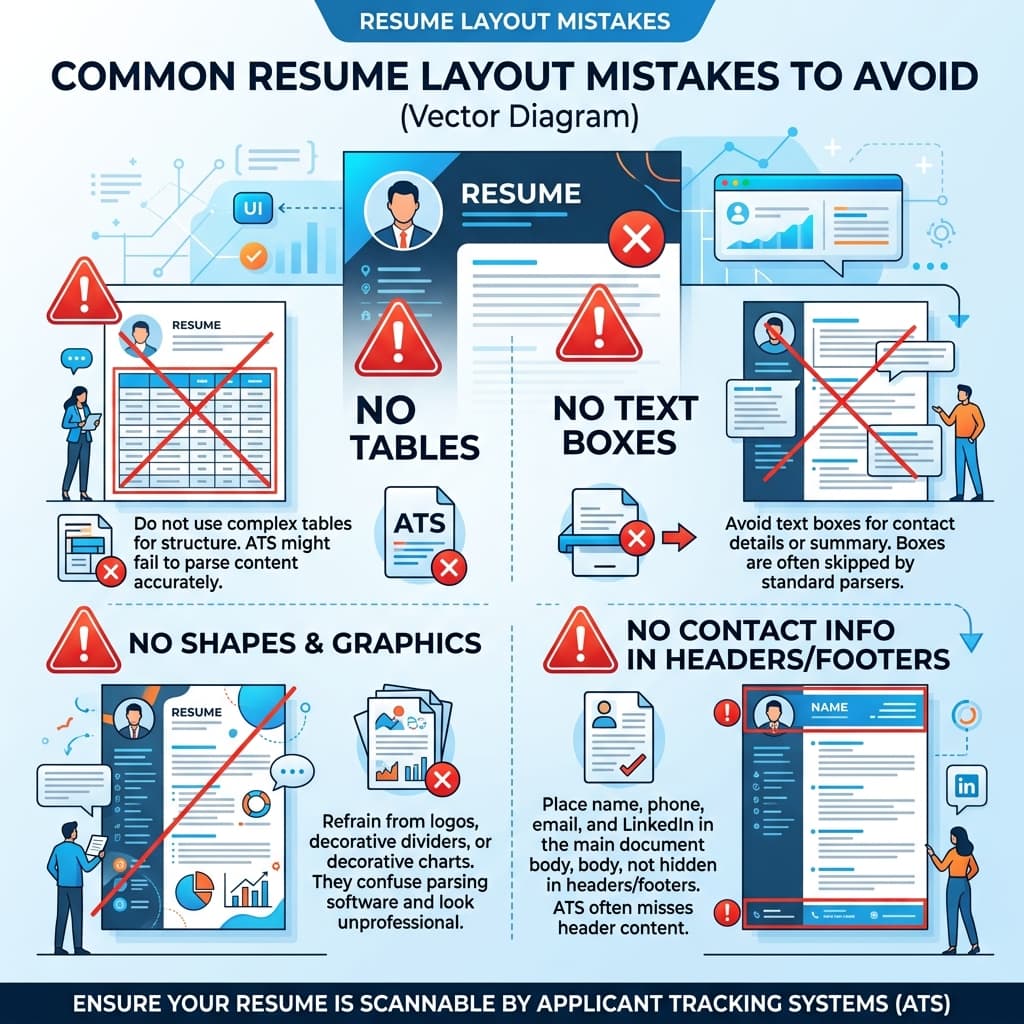
- Never use text boxes — content inside text boxes is invisible to most parsers
- Never use tables for layout — parsers read table cells out of order
- Never use shapes or SmartArt in Word documents
- Avoid using the header and footer sections of your Word document — many ATS systems skip these entirely
- Use standard paragraph formatting and tab stops instead of tables for alignment
Section Headings the ATS Actually Understands
ATS software is trained to recognize specific section heading labels. When you use a creative alternative, the system may fail to categorize that section, causing your experience or education to go unrecorded. This directly impacts your match score for the job.
Use These Standard Headings
- Work Experience (not 'Where I've Been' or 'My Journey')
- Education (not 'Academic Background' or 'Learning')
- Skills (not 'My Toolkit' — though 'Core Competencies' is borderline safe)
- Summary or Professional Summary (not 'About Me' or 'My Story')
- Certifications (not 'Credentials' or 'Badges')
- Projects (widely recognized by modern ATS platforms)
- Volunteer Experience (standard and recognized)
When in doubt, choose the most generic, industry-standard label. Creativity in section naming has zero upside and significant downside risk when ATS is involved.
Contact Information: Placement and Format
Your contact information must appear at the very top of the main document body — not in a Word header section, not in a text box, and not embedded in a graphic. Place your full name, professional email address, phone number, LinkedIn URL, and city/state as the first block of text in the document. Many ATS systems specifically look for contact data in the first 20% of the document.
Bullet Points vs. Paragraphs
Use bullet points for every item in your Work Experience and Education sections. Parsers are trained to extract bullet points as discrete achievements and responsibilities. Dense paragraphs of text are harder to parse and harder for humans to skim. Each bullet should start with a strong action verb, quantify impact where possible, and stay between one and two lines. Aim for four to six bullets per role.
Resume Length: One Page or Two?
Resume length should match your experience level. Freshers and candidates with fewer than three years of experience should target one page. Experienced professionals with five or more years can use two pages to adequately represent their career history. Going beyond two pages is rarely justified unless you are applying for an academic or research position. The ATS does not penalize length — but a human reviewer will appreciate conciseness.
Common Formatting Mistakes That Kill Your ATS Score
- Saving a PDF as an image scan — the ATS sees a blank white rectangle with no parseable text
- Using abbreviations for job titles the ATS does not recognize (e.g., 'Sr. PM' instead of 'Senior Product Manager')
- Listing dates in non-standard formats — use 'January 2023 – March 2025' or 'Jan 2023 – Mar 2025', not '1/23-3/25'
- Omitting keywords from the job description — ATS ranks resumes by keyword match, so mirror the language in the posting
- Using photos, logos, or decorative borders anywhere in the document
- Listing skills only in a visual skills bar or rating graphic — the parser cannot read a filled circle as '4 out of 5'
ATS-Friendly Resume Checklist
- File saved as .docx for ATS portals, .pdf for direct email submissions
- Single-column layout with no text boxes, tables, or columns
- Font is Arial, Calibri, Times New Roman, Helvetica, or Garamond at 10–12pt
- Contact information is in the main document body at the very top
- Section headings use standard labels: Work Experience, Education, Skills, Summary
- All job roles use bullet points starting with action verbs
- Dates are formatted consistently (e.g., Jan 2022 – Dec 2024)
- Keywords from the job description appear naturally throughout the resume
- No graphics, photos, icons, skill bars, or decorative elements
- No content stored in Word headers or footers
- Resume is one page (fresher) or two pages (experienced) maximum
ATS-friendly formatting is not about stripping away personality — it is about ensuring your real qualifications actually get read. Once you pass the parser, your content, your achievements, and your keywords do the heavy lifting. Get the format right first, then focus on making every bullet count.
Check your resume's ATS score — free
Upload your resume + paste any job description. Get your score in 60 seconds.
Analyze My Resume →